Let's set up your account together — we'll guide you every step of the way.
1
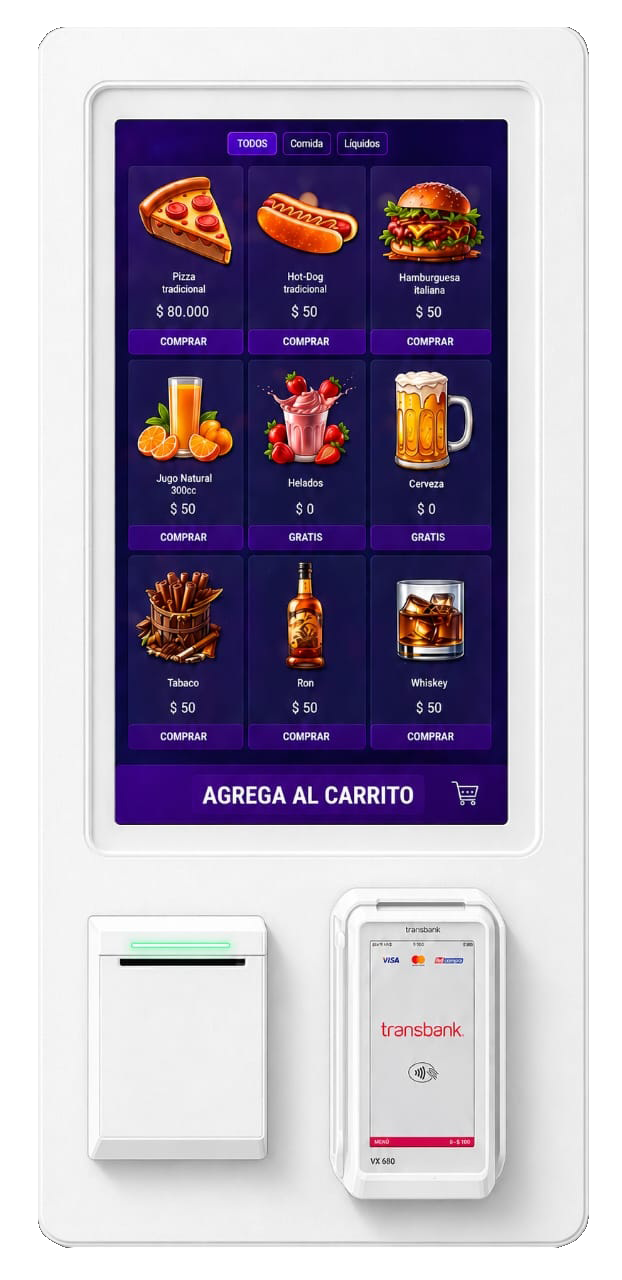
Kiosk body
The chassis structure that houses the kiosk's internal components. This surface can be used for branding and brand customization.
2
Touch screen
The user interacts directly with the touchscreen to browse, select products, and move through the purchase process.
3
On-screen app
Self-service application with an intuitive interface, designed for selecting products, reviewing quantities and confirming the purchase.
4
Categories
Top buttons that let you filter products by type or category, showing on screen only the products matching the selection made.
5
Products
Each product can be selected from the touchscreen. It includes an image, title, description, and price, and lets you increase or decrease the quantity.
6
Add to cart
Lower area that displays the total to pay. When pressed, it opens the shopping cart and lets you continue to select the available payment method.
7
Thermal printer
High-quality thermal printer for 80 mm paper rolls. Prints purchase receipts quickly, clearly, and reliably.
8
Transbank POS
Integrated payment terminal for transactions with credit cards, debit cards, and other supported methods. Enables secure, fast payments.